
- Каталог оборудования Siemens
- Каталог продуктов Siemens Industry
- Приводная техника
- Техника автоматизации
- Системы автоматизации
- Системы визуализации SIMATIC HMI
- Системы идентификации
- Промышленные коммуникации SIMATIC NET
- Промышленные аппараты управления SIRIUS
- Системы
- Коммутационные аппараты SIRIUS
- Аппаратура защиты
- Фидеры и пускатели двигателей
- Функциональные, коммутирующие реле и преобразователи
- Оборудование безопасности
- Позиционные выключатели и выключатели для систем безопасности
- Устройства управления и индикации
- SIRIUS ACT pushbuttons and indicator lights
- Actuators and indicators, 22 mm, round, plastic, black
- Actuators and indicators, 22 mm, plastic with metal front ring, matte
- Actuators and indicators, 22 mm, metal, shiny
- Actuators and indicators, flat, 30 mm, metal, matte
- Actuators and indicators, customized designs
- Holders
- Modules for actuators and indicators
- Enclosures
- Accessories
- Кнопки и индикаторы
- Двуручный пульт управления SIGUARD
- Тросовые выключатели SIGUARD
- Ножной выключатель SIGUARD
- Сигнальные колонны SIGUARD
- Встраиваемые индикаторы SIGUARD
- SIRIUS ACT pushbuttons and indicator lights
- Планирование и конфигурирование для SIRIUS
- Блоки питания SITOP
- Блоки питания SIRIUS 4AV
- Transformers
- Фильтры SIDAC-F
- Дроссели SIDAC-D
- Промышленные информационные технологии
- Управление на базе РС
- Системы управления процессом
- Контрольно-измерительные приборы
- Анализаторы процесса
- Блоки питания SITOP
- Продукты для специальных требований
- Energy
- Автоматизация и безопасность зданий
- Низковольтная коммутационная техника
- Технология безопасности
- Системные решения и продукты для отраслей
- Сервис
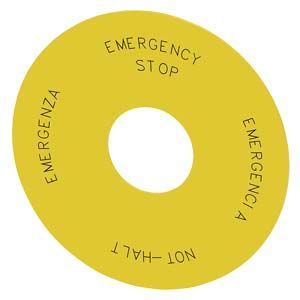
Other labels
- Заказные данные (42)
- Информационные материалы
Опции
Customized inscriptions
The labels can be inscribed with texts and symbols not listed in the ordering data.
The EMERGENCY STOP backing plates are divided into 4 sheet segments. Each segment can be custom-labeled. The font size varies according to the selected characters/letters, and can be adapted individually.
Example: 4 sheet segments for customized inscription
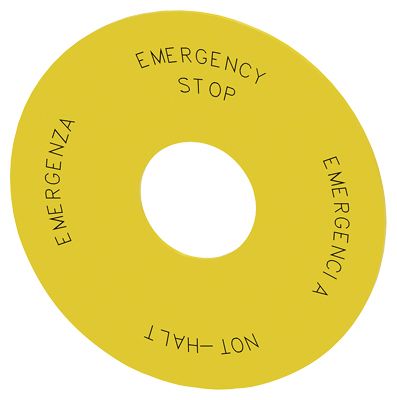
SIRIUS ACT accessories, EMERGENCY STOP, backing plate for sticking on, Ø75mm, 4-language inscription
Ordering notes
Append the following order codes to the Article No.:
- Q0Y: Text line(s) in upper/lower case, always upper case for beginning of line (e.g. Text)
- Q1Y: Text line(s) in upper case (e.g. TEXT)
- Q2Y: Text line in lower case (e.g. text):
- Q5Y: Text line(s) in upper/lower case, all words begin with upper case letters (e.g. Text / Text)
- Q9Y: Inscription of choice, text or symbol, can only be ordered via SIRIUS ACT Configurator with a Configuration Identification Number (CIN)
When ordering, specify the required inscription in plain text without spaces, in addition to the Article No. and order code. In the case of special inscriptions with words in languages other than German, give the exact spelling and specify the language.
In the case of customized inscription with as many as 4 radial segments, the text must be assigned to the respective radial segment (Z1-Z4), e.g. Z1=Text 1, Z2=Text 2. For long words you can also specify the end-of-line division (see ordering example 1 and 2).
The SIRIUS ACT Configurator must be used to select special inscriptions and symbols (order code Q9Y). In this case a CIN (Configuration Identification Number) is generated for placement of future orders. It is then possible to place an order directly using the CIN and the SIRIUS ACT Configurator (Mall shopping cart) or via the standard ordering channels.
Standard ordering channels:
- Industry Mall
- Configurator: http://www.siemens.com/sirius-act/configurator
- Electronic Catalog CA01 on DVD
- Industry Mall: http://www.siemens.com/industrymall
Ordering example 1
A label with 2 lines of text is required:
3SU1900-0BB31-0AZ0
Q1Y
Z1=Text1
Z2=Text2Ordering example 2
A label inscribed with symbol No. 5638 according to IEC 60417 is required:
3SU1900-0BB31-0AZ0
Q1Y
Z1=Text 1
Z2=Text 2
Z3=Text 3
Z4=Text 4