
- Каталог оборудования Siemens
- Каталог продуктов Siemens Industry
- Приводная техника
- Техника автоматизации
- Системы автоматизации
- Системы визуализации SIMATIC HMI
- Системы идентификации
- Промышленные коммуникации SIMATIC NET
- Промышленные аппараты управления SIRIUS
- Системы
- Коммутационные аппараты SIRIUS
- Аппаратура защиты
- Фидеры и пускатели двигателей
- Функциональные, коммутирующие реле и преобразователи
- Оборудование безопасности
- Позиционные выключатели и выключатели для систем безопасности
- Устройства управления и индикации
- Планирование и конфигурирование для SIRIUS
- Блоки питания SITOP
- Блоки питания SIRIUS 4AV
- Transformers
- Фильтры SIDAC-F
- Дроссели SIDAC-D
- Промышленные информационные технологии
- Управление на базе РС
- Системы управления процессом
- Контрольно-измерительные приборы
- Анализаторы процесса
- Блоки питания SITOP
- Продукты для специальных требований
- Energy
- Автоматизация и безопасность зданий
- Низковольтная коммутационная техника
- Технология безопасности
- Системные решения и продукты для отраслей
- Сервис

SIMOCODE ES (TIA Portal)
- Заказные данные (9)
- Аксессуары (2)
- Информационные материалы
Информационные материалы
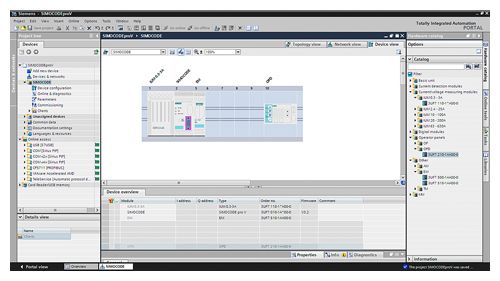
Selection of SIMOCODE pro device configuration in SIMOCODE ES (TIA Portal)
More information
For technical specifications see https://support.industry.siemens.com/cs/de/en/ps/16716/td
SIMOCODE ES is the central software for configuration, startup, operation and diagnostics of SIMOCODE pro.
Version 14, which is based on the central engineering framework Totally Integrated Automation Portal (TIA Portal), is available in addition to SIMOCODE ES Version 2007.
SIMOCODE ES V14 is integrated seamlessly when further TIA Portal-based software such as STEP 7 or WinCC is available, thus enabling users to achieve a consistent, efficient and intuitive solution for all automation tasks.
However, use of SIMOCODE ES V14 as stand-alone software also provides these advantages.
Three program versions
The user can choose between three different versions of SIMOCODE ES: SIMOCODE ES Basic, SIMOCODE ES Standard and SIMOCODE ES Premium. While SIMOCODE ES Basic is a powerful tool for startup or maintenance personnel, SIMOCODE ES Standard and Premium are the perfect tools for engineers or configuration engineers on account of their larger scope of functions and integrated graphics editor. Unlike the Standard version, SIMOCODE ES Premium also permits parameterization and diagnostics through PROFIBUS/PROFINET. Indication of all operating, service and diagnostics data supplies important information about the current state of the motor and plant at all times – everywhere on PROFIBUS/PROFINET.
SIMOCODE ES V14
Basic
Standard
Premium
Access through the local interface on the device
✓
✓
✓
Parameter assignment in list form
✓
✓
✓
Parameter printing in list form
✓
✓
✓
Operating
✓
✓
✓
Diagnostics
✓
✓
✓
Test
✓
✓
✓
Service data
✓
✓
✓
Analog value recording1)
✓
✓
✓
Trend display of measured values
--
✓
✓
Parameterization with convenient graphical display
--
✓
✓
Parameterizing with the integrated graphics editor (CFC-based)
--
✓
✓
Printing of diagrams
--
✓
✓
Parameter comparison
--
✓
✓
Access through PROFIBUS/PROFINET
--
--
✓
Teleservice through MPI
--
--
✓
S7 routing2)
--
--
✓
✓ Function available
-- Function not available
1) For SIMOCODE pro V.
2)See http://support.automation.siemens.com/WW/view/en/109738745.
Working with libraries
Users can create copy templates for SIMOCODE pro device configuration and can manage them in global or project libraries. This way, individual modules, diagrams and complete device configurations can be saved as reusable elements for frequently occurring tasks.
Integrated graphics editor
The graphics editor is part of SIMOCODE ES Standard and SIMOCODE ES Premium. It is based on the Continuous Function Chart (CFC) and adds a powerful tool to the parameterizing interface that enables easy parameterization of devices by Drag&Drop. Extremely compact documentation of all configured parameters is possible, as is the graphic online presentation of the configured device functions including all signal states during operation.
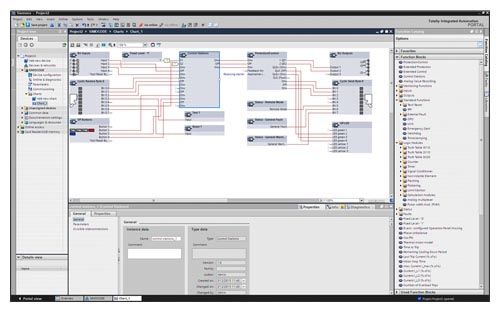
Parameterize easily and ergonomically with the CFC-based graphics editor of SIMOCODE ES V14
Online functions for startup and diagnosis
To this end, SIMOCODE ES provides powerful functions for startup and diagnosis of motor feeders. Besides a detailed display of status information and the causes of faults, all available measurement and statistics data can be retrieved online. Access to the fault and event memory and also to analog values recorded in the device, e.g. current and voltage, is also possible.

Commissioning functions of SIMOCODE ES V14
Trend display of measured values
With this online function, SIMOCODE ES Standard or Premium can present the trends of different measured values. It is thus possible for example to record and evaluate the start-up characteristic of a motor or its behavior in different load conditions.

Live trend display of SIMOCODE V14
Additional functions
SIMOCODE ES V14 offers numerous advantages of the TIA Portal that can be used in an integrated working environment.
Seamless integration
When using other TIA Portal-based software such as STEP 7 or WinCC, for example, the configuration for devices and networks for all components used is created in a standardized environment.
Особенности
- Easy parameterization with the graphics editor based on the Continuous Function Chart (CFC) reduces engineering work and shortens start-up times
- Clear plant documentation by means of graphic presentation
- Detailed information, also when there are faults, is a help for maintenance personnel and shortens downtimes
- Universally applicable through stand-alone version or seamless integration into the central engineering framework when other TIA Portal-based software such as STEP 7 or WinCC are available
- Parameter changes are also possible during normal operation
- Users can create copy templates for device configurations and can manage them in global libraries